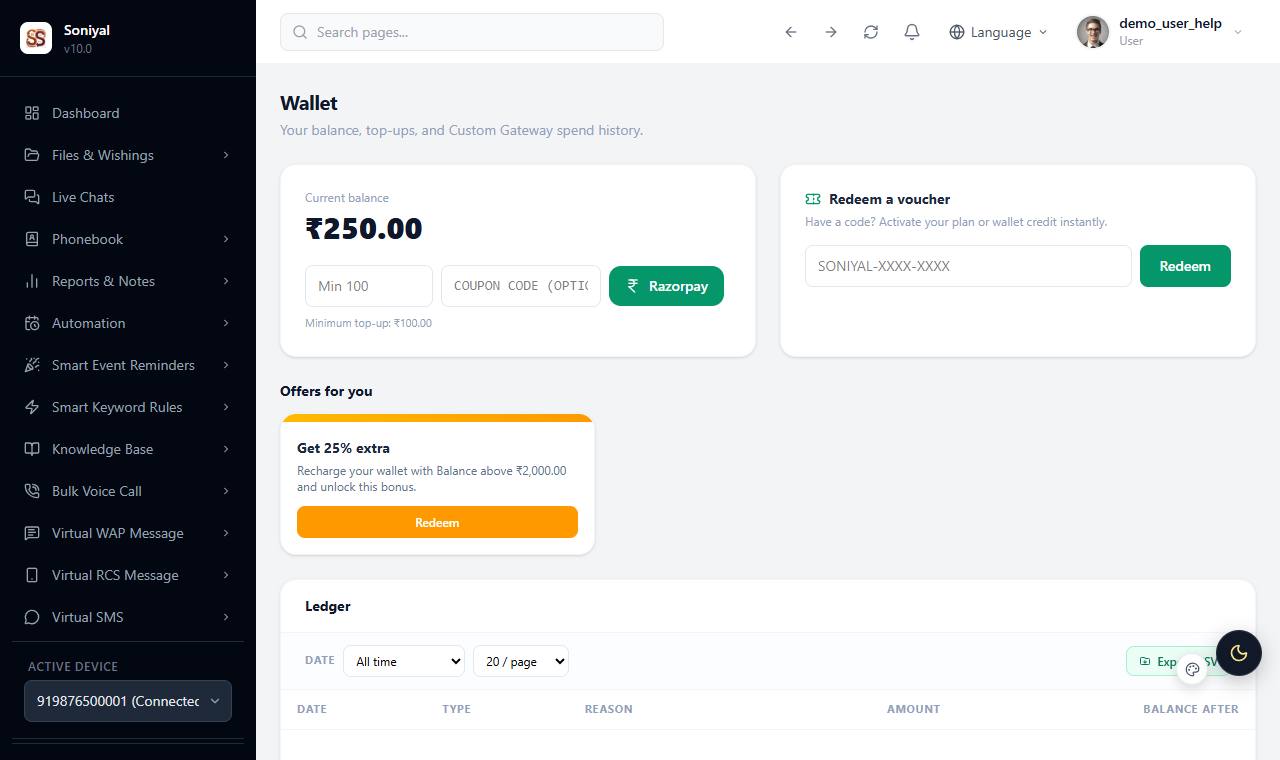
Top up your wallet, redeem vouchers and coupons, buy a plan and understand where your money goes.
Getting started2 min readUpdated:
Your wallet holds prepaid balance that is used by features that charge per message — Bulk Voice Calls, custom gateways, Virtual WAP / RCS / SMS and more. Plans (Packs) unlock features and limits. You manage both from the Wallet and Billing pages.
When to use it
When your balance runs low, when a campaign says “insufficient balance”, or when you want to upgrade your plan.
Example
Amit tops up ₹500 with coupon WELCOME, sees ₹600 credited in the ledger, and then uses the balance for a Bulk Voice Call campaign.
Pro tips
Look at “Offers for you” on the Wallet page — recharge bonuses appear there automatically.
Export the ledger to CSV for your accounting.
Wallet credit can expire if your admin enabled balance expiry; reminders are sent before it does.
Step by step
Open Wallet
Click Wallet in the left menu to see your current balance, offers and the ledger.
Top up
Enter an amount (the minimum is shown under the box), add a coupon code if you have one, and pay with the available payment button.
Redeem a voucher
Paste a voucher code into “Redeem a voucher” to activate a plan or add wallet credit instantly.
Read the ledger
The Ledger lists every credit and debit with date, reason and balance after; filter by date and export to CSV.
Upgrade your plan
Open Billing → Upgrade / Billing or Packs to compare plans and buy one.
Set payment details
Open Billing → Payment Settings if you collect payments from your own customers.
Frequently asked questions
My payment succeeded but balance did not change?
Refresh the Wallet page after a minute; if it is still missing contact support with the payment reference.
Is the wallet refundable?
That depends on your provider’s refund policy, shown on the Refund Policy page.