Account settings, API key and personal preferences
Find your API key, tune festival reminders, API number rules and other personal switches.
Getting started2 min readUpdated:
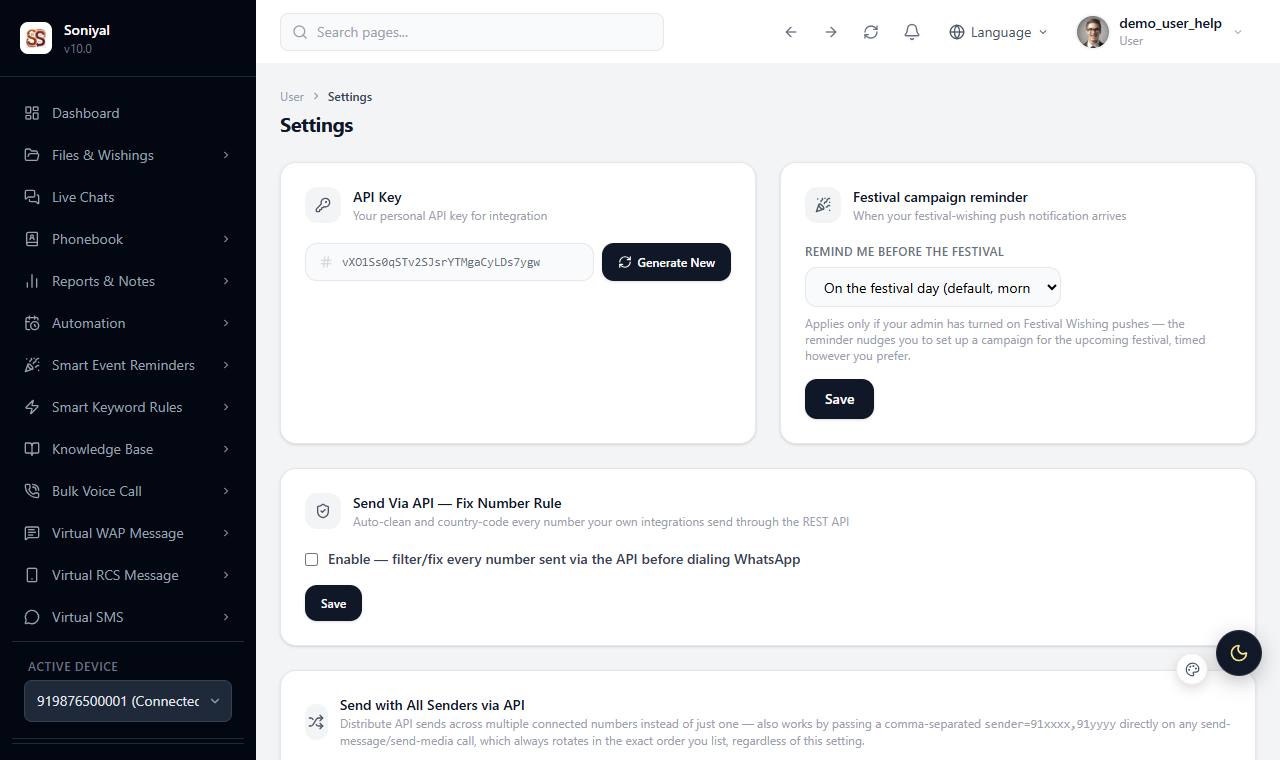
The Settings page under your profile collects the options that belong to you personally: your API key for integrations, how API numbers are cleaned, whether API sends rotate across all connected numbers, and when festival reminders arrive.
When to use it
When you integrate another system through the REST API, or want to change how your account behaves by default.
Example
A developer connects a website form to the REST API: copies the API key, switches on number-fix so “98765 43210” becomes 919876543210, and sends test requests.
Pro tips
Treat the API key like a password — never paste it in public chats or screenshots.
Generate a new key after a developer leaves your team.
Step by step
Open Settings
Click your name at the top right and choose Settings.
Copy your API key
Under API Key press the key to copy it. Use Generate New if you think it leaked — the old key stops working.
Set the festival reminder
Choose how many days before a festival you want the reminder, then Save.
Choose number rules
Enable “Send Via API — Fix Number Rule” to auto-clean and country-code every number your integrations send.
Enable rotation
Turn on “Send with All Senders via API” to distribute API sends across all connected numbers.
Save each card
Every card has its own Save button, so you can change one option at a time safely.
Frequently asked questions
Where is the API documentation?
Open API Docs in the left menu for ready-made code samples.
Does generating a new key log me out?
No, only integrations using the old key stop working.