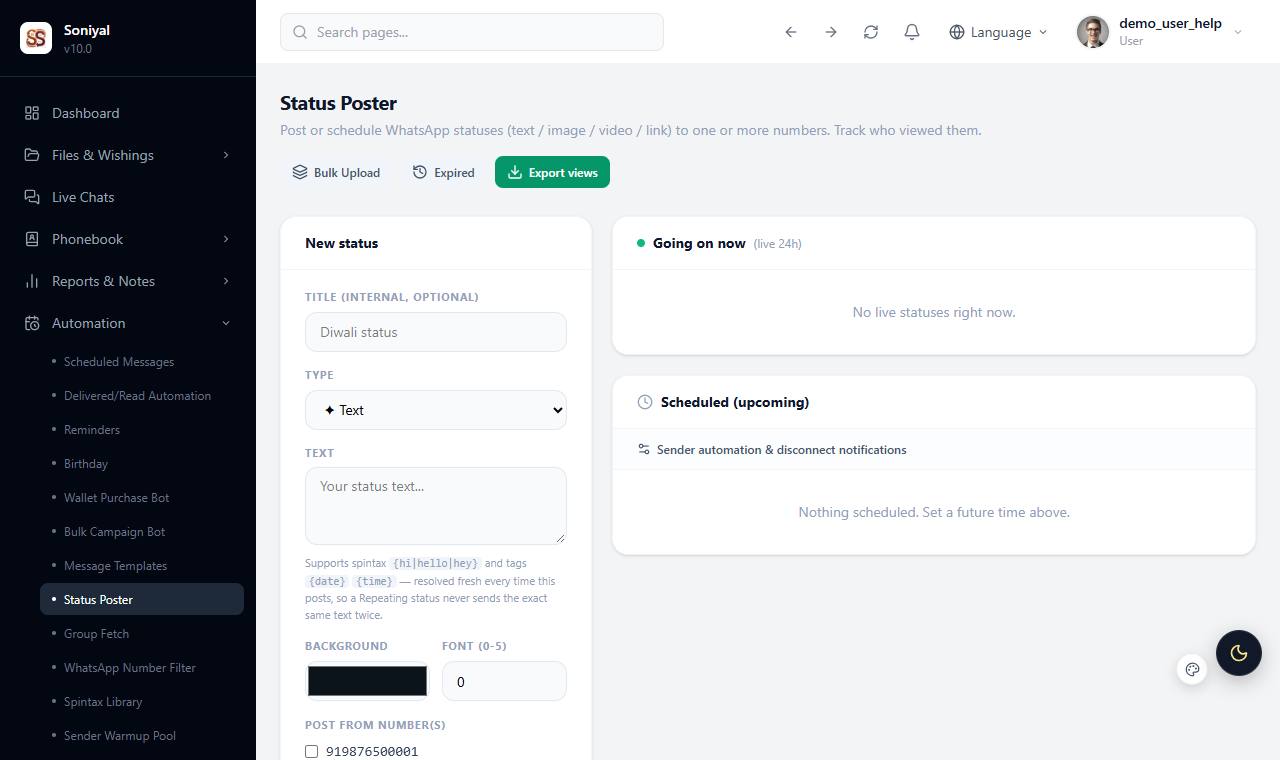
Status Poster: post and schedule WhatsApp statuses
Publish text, image and video statuses now or later, from one or many numbers.
Automation1 min readUpdated:
WhatsApp Status is where customers look every day. Status Poster lets you write once, choose numbers and post immediately or schedule — including repeating posts and bulk uploads.
When to use it
Daily offers, new arrivals, motivational posts, event announcements.
Example
A bakery posts “Fresh cake at 5 PM today!” with a photo at 4:30 PM every day on its two numbers.
Pro tips
Use Spintax so repeated statuses differ.
Statuses disappear after 24 hours — repost daily.
Step by step
Open Status Poster
Go to Automation → Status Poster.
Compose
Write the text or choose an image or video, and a background colour for text statuses.
Choose numbers
Pick the connected numbers that should post it.
Post or schedule
Post now, or pick a date and time, optionally with repeats.
Check the report
Open the report to see which numbers posted successfully; expired items are listed separately.
Frequently asked questions
Who sees my status?
The contacts who have your number and your WhatsApp status privacy settings.