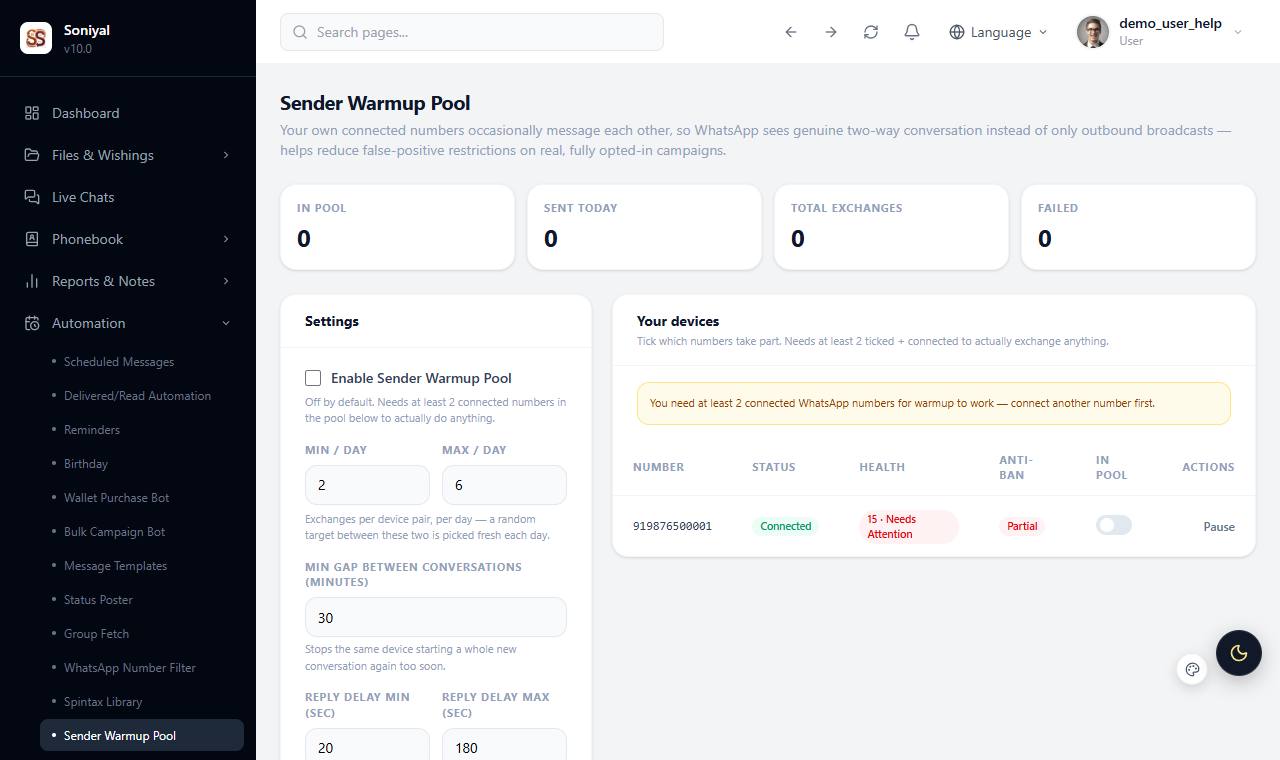
Let your numbers chat with each other automatically so new numbers look natural before bulk sending.
Automation1 min readUpdated:
A brand-new WhatsApp number that suddenly sends hundreds of messages is risky. The Warmup Pool makes your connected numbers exchange natural messages for some days, gradually raising their activity.
When to use it
Before you start using a new number for campaigns, or after a long period of inactivity.
Example
Three new numbers warm up for 7 days with 20 → 60 messages a day before the first real campaign.
Pro tips
Warm up slowly — patience protects the number.
Keep the numbers connected during warming.
Step by step
Open the pool
Go to Automation → Sender Warmup Pool (available when enabled for your account).
Add numbers
Select at least two of your connected numbers.
Choose intensity
Set how many messages per day and the hours.
Start warming
Switch it on and leave it for several days.
Monitor
Check the log and stop it when you are satisfied.
Frequently asked questions
Does it guarantee no ban?
No tool can; it improves your odds together with sensible delays and content.