Brand Kit: your logo and brand text in every design
Save your logo and brand details once and drop them into any design with one click.
Design & files 1 min read
Updated:
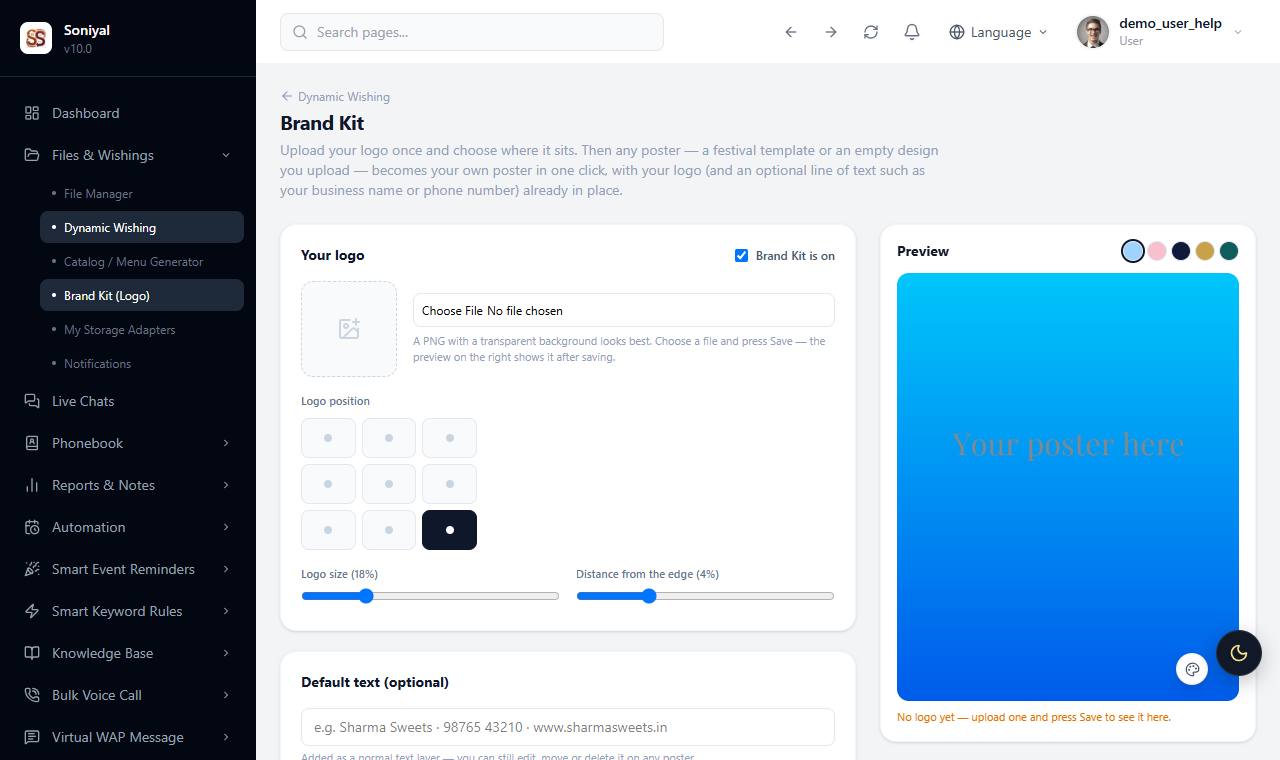
Brand Kit stores your logo and brand text so every poster and catalogue looks consistent without re-uploading files each time.
When to use it
When you make designs regularly and want your identity on all of them.
Example
A tutor uploads her logo once and adds it to 30 different festival posters in seconds.
Pro tips
- Use a square or wide logo at high resolution.
- Update the kit when you rebrand — new designs pick up the change.
Step by step
-
Open Brand Kit Go to Files & Wishings → Brand Kit (Logo).
-
Upload your logo Choose a clear PNG; a transparent background works best.
-
Add brand text Write the brand name, tagline or contact line.
-
-
Use it In the Dynamic Wishing editor, insert the logo and brand text with one click.
Frequently asked questions
Which file types work?
PNG and JPG; PNG with transparency is best.
Does it change old designs?
No, only new insertions use the updated kit.
Ready to try it yourself?
Create a free account and connect your first WhatsApp number in minutes.
Start free
