Self-Hosted Server: run the engine on your own server
Download the engine, run it on your own machine and connect your numbers through it.
Business tools1 min readUpdated:
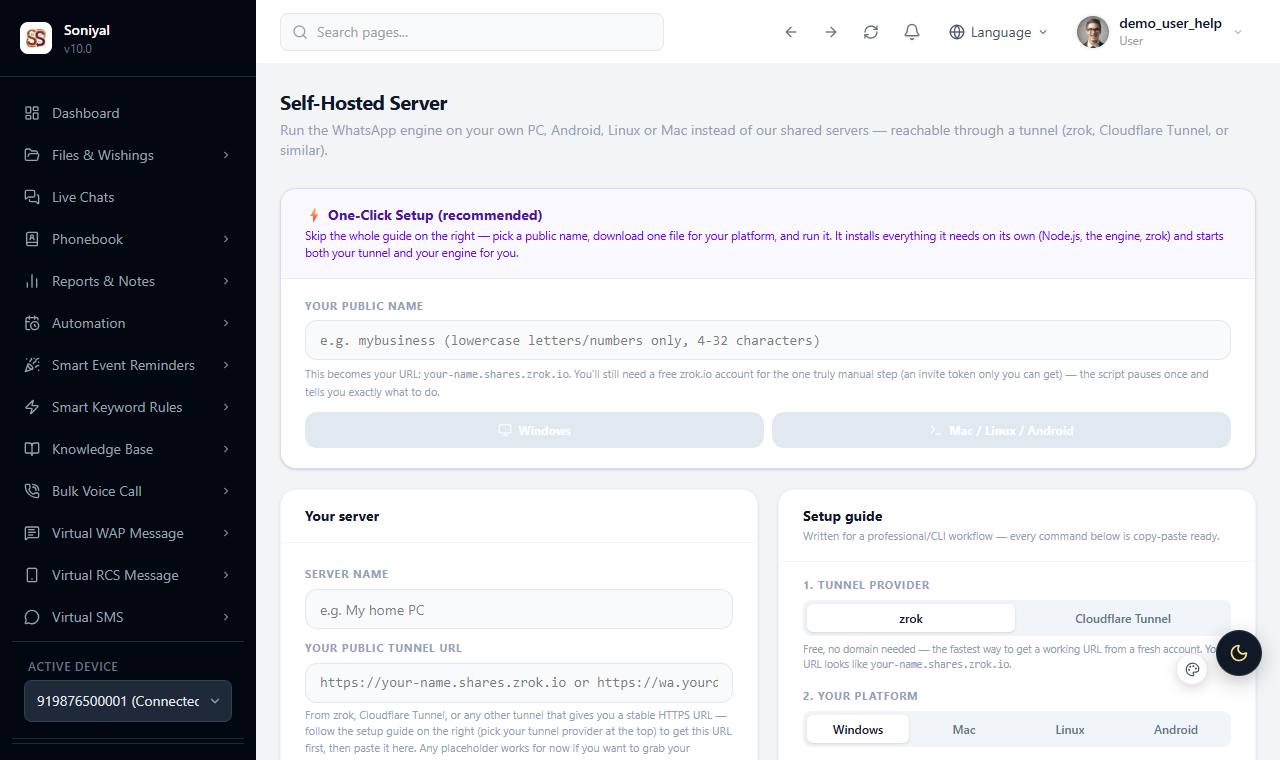
If your plan allows, you can run the WhatsApp engine on your own server instead of the shared fleet. It gives you more control and keeps your numbers on infrastructure you own.
When to use it
Large senders, privacy-sensitive businesses or anyone who wants their own IP address.
Example
A call centre runs the engine on a small VPS and keeps all 12 numbers on it.
Pro tips
Keep the server updated and backed up.
Use HTTPS and a firewall.
Step by step
Open the page
Go to Self-Hosted Server in the left menu (shown when enabled).
Download the engine
Choose the download for your system and follow the one-click setup guide.
Register your server
Enter its address so the dashboard can reach it.
Connect numbers
Scan QR codes as usual; they are now served by your own engine.
Monitor
Check the status and update when new versions appear.
Frequently asked questions
Do I still need this dashboard?
Yes, it remains your control panel.
What does it need?
A server with Node.js and a stable internet connection; the guide lists the details.